How to chop samples like an MPC: five techniques
Chopping is the craft of cutting a piece of recorded music into pieces and playing those pieces as an instrument. It is how most hip-hop from the 90s onward was made, on an MPC or an SP-1200, and the workflow has barely changed: load, cut, put the cuts on pads, play. This guide covers the five techniques I use on every beat, with a free online sampler to practise on. Everything below happens in the browser; the file never leaves your computer.
Before you chop: what makes a sample choppable
Not every loop wants to be chopped. The ones that do have clear hits (chord stabs, piano notes, horn blasts), a stable key, and a tempo you can live with, because you will mostly play the chops at their original speed. Soul, jazz, library music and film scores are the classic sources. Record a chord progression yourself if you can: it sidesteps clearance and you control the key. Eight bars is plenty; you usually end up using two.
Technique 1: equal slices (the grid chop)
Cut the sample into 16 equal parts. If the loop is one bar long, each slice is a 16th note; if it is two bars, each slice is an 8th. Put the slices on 16 pads in order and play them back in order: you get the original loop. Now play them out of order, repeat one, skip two, and the loop becomes something new while keeping its rhythm.
Why it works: because the slices are rhythmically exact, any order you play stays on the grid. It is the fastest way to rearrange a loop. Why it fails: if the sample's tempo doesn't match yours, every slice is slightly the wrong length and the chops drift. Fix the tempo first, or use technique 2.
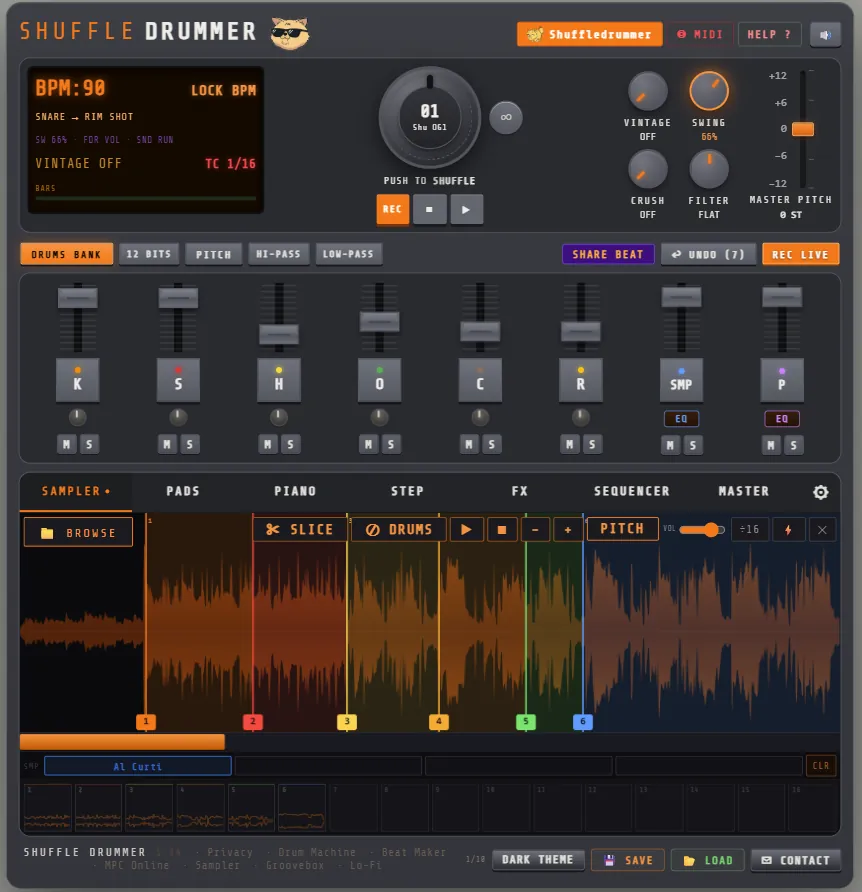
In Shuffle Drummer: SAMPLER tab → load the file → SLICE → 16 equal. Then PADS tab to play them.
Technique 2: transient chops (the musical chop)
Instead of cutting at equal distances, cut at every attack: the start of each note, each chord, each drum hit. Now every pad holds one musical event, and nothing starts in the middle of a note. This is how you chop a rubato piano intro, a vocal phrase or a bass line that doesn't sit on a grid.
Shuffle Drummer has a transient detector: SLICE → snap to transients places a marker on each attack. Zoom into the waveform and fix the two or three markers it got wrong (it always gets two or three wrong; so does every sampler). Up to 64 slices per sample, which is enough for a whole phrase.
Technique 3: the two-chop flip
Most classic beats use two chops. Not sixteen. One on the downbeat, one answering it. The entire genius of a Premier or Pete Rock beat is often which two bars of a record he chose and where he put them against the drums.
Method: find the one chop in your sample that sounds like a beginning (a chord with a strong attack, usually the first beat of a phrase) and put it on the 1. Find a chop that sounds like an answer (the second chord of the progression, or the same chord an octave up) and put it on the 3, or on the “a” of 2 with the kick. Program it like this:
| 1 | e | & | a | 2 | e | & | a | 3 | e | & | a | 4 | e | & | a | |
|---|---|---|---|---|---|---|---|---|---|---|---|---|---|---|---|---|
| Chop A | A | A | ||||||||||||||
| Chop B | B | |||||||||||||||
| Kick | ▲ | ■ | ■ | |||||||||||||
| Snare | ▲ | ▲ |
Chop A on the 1 and again on the “&” of 4 (a pickup into the next bar), chop B with the kick on the “a” of 2. Loop it. If it works with two, it will work with four; if it doesn't work with two, more chops won't save it. In Shuffle Drummer, the SMP rows in the STEP tab sequence the slices exactly like the drums.
Technique 4: pitch it down
Dropping a sample by one to three semitones does three things at once: it slows it (so it sits better under a slow beat), it darkens it (the “dusty” sound is partly just a lower pitch), and it hides the seams between chops, because the attacks soften. Almost every lo-fi and boom bap sample you have heard is pitched down. Going up, by contrast, gives the chipmunk-soul sound: bright, urgent, Kanye in 2003.
Chop first, pitch second. If the sample's key clashes with your bass, try −2, −3 and −5 semitones before changing the bass; one of them usually lands in a key that works. The PITCH control in the SAMPLER tab applies to the whole sample; the PITCH fader mode in the mixer lets you pitch the SMP channel against the drums while it plays.
Technique 5: remove the drums from the loop
The best chord loop on the record has a drummer on it, and his drums fight yours. Old school answer: EQ the lows out and play louder drums on top. Modern answer: separate the harmonic part from the percussive part. Shuffle Drummer's ⊘ DRUMS button does this in the browser, in a few seconds, with no upload: it keeps melody, bass and vocals and drops most of the drums. It is a signal-processing separation rather than an AI stem splitter, so on dense mixes a ghost of the drums remains; it is usually inaudible under your own kick and snare. One click to undo if you don't like it.
Use it before chopping if the drums are loud, after chopping if you only need it on one or two chops. And sometimes keep the drums: a chop with its original snare in it, laid on the 2, is a trick in itself.
▶ OPEN THE ONLINE SAMPLER — FREE
Putting the chops against the drums
- Drums first, then chops, or chops first then drums; but never both at once. Decide which one leads. In boom bap the drums lead and the chops fill the holes. In lo-fi the chops lead and the drums are lazy underneath.
- Mind the lows. A chop full of bass fights the kick. Roll the lows off the SMP channel (HI-PASS fader mode) and let the kick own the bottom, or let the sample's bass be the bass and skip a bass line altogether.
- Swing applies to the drums, not the chops. In Shuffle Drummer the sampler steps sit on the straight grid while the drums swing, so put the chops on on-beats (1, &, 3) where swing does nothing, or nudge the SMP channel with the time-shift fader to taste.
- Vary the second half. The fourth bar of a four-bar loop should differ: a different chop, a chop reversed, or silence. That is what makes a loop feel played instead of pasted.
A word on clearing samples
If you release music made from someone else's record, you need the rights to both the recording and the composition. For practice, demos and beats you keep to yourself, chop anything. For releases, record your own source material, use royalty-free loops, or clear the sample. Shuffle Drummer keeps every file local to your browser, so what you chop is your business.
Further reading
- How to make a lo-fi beat, which is mostly a chopping guide with dust on it.
- Six boom bap drum patterns, for the drums under the chops.
- The online sampler and MPC-style online pages, for the tool itself.