Beat Maker Online — a Complete Free Online Beat Maker in Your Browser
Shuffle Drummer is a free online beat maker: a drum machine with real swing, a sampler, a Minimoog-style synth, a piano roll, a mixer with master EQ and bus compressor, and a song mode, all in one browser tab. Nothing to install, nothing to sign up for. Open it and make a beat right now, on desktop or mobile.
▶ MAKE A BEAT NOW — FREE
No download · no signup to start · no ads
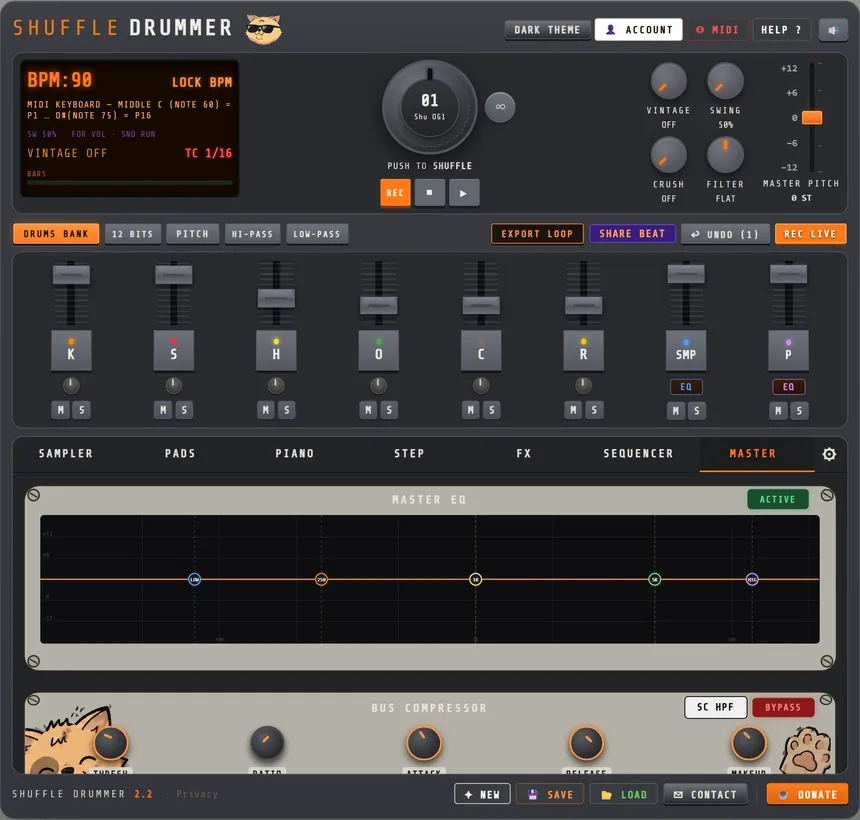
From first kick to finished track, in 6 steps
- Program your drums. Pick a kit in the DRUMS BANK, lay down kicks and snares on the 16-step grid, add hi-hats with ghost notes, then turn the SWING knob until it nods. The pattern can run 2, 4 or 8 bars.
- Flip a sample. Load any sound into the SAMPLER tab, slice it by hand or on the transients, pitch it, strip the drums out of the loop if you need to, and play the slices on pads like an MPC.
- Add bass and melody. Open the PIANO tab: a sampled piano or the Minimoog-style synth with 96 presets, recorded live or drawn in the piano roll, on up to four melodic tracks.
- Mix and color. Every channel has a fader, EQ and filters; the MASTER tab adds a 5-band EQ, the bus compressor, PUNCH transient shaping, tape emulation, a limiter and a LUFS meter. The FX tab adds reverb, delay and 16 master FX pads.
- Arrange. In the SEQUENCER tab, PRINT each pattern as a part (intro, verse, hook) and chain them into a full song.
- Export or share. Bounce WAV stems or a master for your DAW, export the MIDI, send a one-click share link anyone can remix, or publish to the TOP BEATS gallery.
New to this? Follow the step-by-step guide to making your first beat online.
Everything a beat needs, in one tab
Drums that groove
The drum machine is the heart of the beat maker: 6 drum tracks, a shuffle wheel of hand-made grooves, a swing knob from 50% to 75%, per-step velocity (click high for an accent, low for a ghost note) and a TIMING mode to push or drag single hits off the grid at tick resolution. Each drum channel has its own pitch, filters, 12-bit mode and envelope.
A real sampler
The sampler loads WAV, MP3, FLAC, OGG, AIFF, M4A and Opus, chops them into up to 64 slices (by hand, 16 equal, or snapped to transients), maps the chops to pads, and can remove the drums from a loop so you keep the melody and play your own beat under it. Four sample slots, pitch, and everything sequenced next to the drums.
Synth and piano roll
The Minimoog-style synth gives you basses, leads, keys and pads with 96 presets and a user bank. Record it live from your keyboard or a MIDI controller, then edit the notes in the piano roll. Up to four melodic tracks, each set to SYNTH or to a sampled PIANO.
Mixing and mastering tools
Mix like in a DAW: per-channel faders, EQ, hi-pass and low-pass, then a master chain with a 5-band EQ, an SSL-style bus compressor with sidechain high-pass, a transient designer, Ampex-style tape emulation, a stereo widener, a limiter and a LUFS meter so your export lands at a sensible loudness. The FX tab adds plate, spring, chamber and large reverbs, a synced delay, and 16 master FX pads (cassette sim, vinyl sim, lo-fi, crusher, tape echo, grain, isolator, chorus, flanger, phaser…), up to four at once.
Song mode and export
PRINT patterns into parts in the SEQUENCER tab, name them, cut and reorder them, and play the whole track. Export WAV stems per instrument or a full master, a live take, a MIDI file, or share the full song as a beat card. Saving to your account is free.
Built for hip-hop, works for everything
Shuffle Drummer was made by Mani Deïz, a French hip-hop producer active since 1998, with three friends. The swing engine, the pad workflow and the sampler come straight from the MPC tradition, but house, techno, lo-fi and pop beats come out just as naturally. The whole audio engine runs in your browser on the Web Audio API, with zero dependencies, and updates ship every week. Looking for a specific sound? See the lo-fi beat maker, the MPC-style workflow or the all-in-one online groovebox.
Frequently asked questions
- Can I make a full beat for free?
- Yes. Drums, sampler, synth, piano roll, mixer and song mode are all there with no signup. A free account unlocks saving and WAV export.
- Can I use my own samples?
- Yes: load your own audio, slice it, pitch it, remove the drums if needed, and play it on pads.
- How do I get my beat into my DAW?
- Export WAV stems or a full master, or a MIDI file, ready for Ableton Live, FL Studio, Logic, Cubase and others.
- Is it a DAW?
- It is a beat workstation rather than a full DAW. Make the beat here, then finish the arrangement and mastering in your DAW if you want to.
- Does it work on a phone?
- Yes. The machine reflows to a full-screen touch layout, with the same engine.