Six boom bap drum patterns, as 16-step grids
Boom bap is the sound of the kick (“boom”) and the snare (“bap”) carrying a whole record. The drums are simple on paper and hard to get right, because the feel lives in three things the grid doesn't show: ghost notes, velocity and swing. Below are six patterns I program all the time, written as 16-step grids with the settings that make them work. Each one takes a minute to enter in the free online drum machine: open the STEP tab, click the cells, set the SWING knob.
Legend: ■ normal hit · ▲ accent (loudest velocity) · ▪ ghost note (softest velocity). In Shuffle Drummer, where you click inside a step sets its velocity: high in the cell for an accent, low for a ghost note; drag up or down to fine-tune. One row of 16 cells = one bar at 1/16 grid.
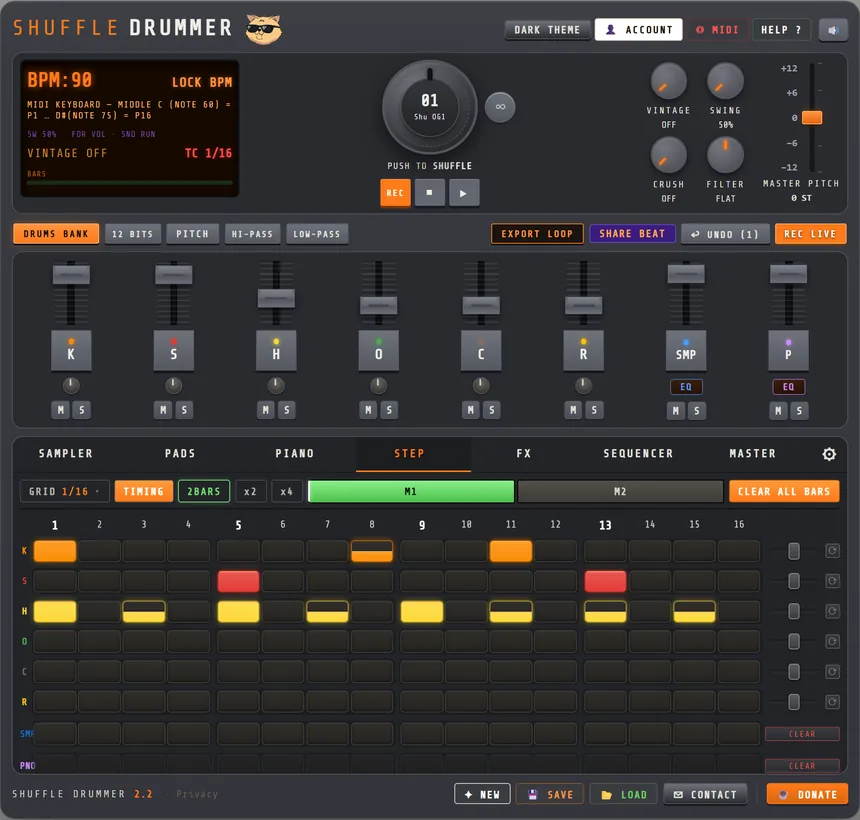
1. The skeleton
Kick on 1 and on the “a” of 2, snare on 2 and 4, hats on every 8th. This is the pattern behind half of the 90s. The kick on the “a” of 2 is the one that gets swung, and it is what pushes into the 3.
| 1 | e | & | a | 2 | e | & | a | 3 | e | & | a | 4 | e | & | a | |
|---|---|---|---|---|---|---|---|---|---|---|---|---|---|---|---|---|
| Kick | ▲ | ■ | ■ | |||||||||||||
| Snare | ▲ | ▲ | ||||||||||||||
| Hat | ■ | ▪ | ■ | ▪ | ■ | ▪ | ■ | ▪ |
Settings: 90–94 BPM · swing 58% · the off-beat hats as ghost notes so the on-beat hats carry the pulse.
2. The chopped kick (Premier-style)
Same backbone, but the kick is syncopated: it answers itself on the “e” of 1 and lands early before the 3. This is the pattern that makes a chopped sample sit right, because the kick leaves holes for the chops.
| 1 | e | & | a | 2 | e | & | a | 3 | e | & | a | 4 | e | & | a | |
|---|---|---|---|---|---|---|---|---|---|---|---|---|---|---|---|---|
| Kick | ▲ | ■ | ■ | ■ | ||||||||||||
| Snare | ▲ | ▲ | ||||||||||||||
| Hat | ■ | ▪ | ■ | ▪ | ■ | ▪ | ■ | ▪ | ■ | ▪ | ■ | ▪ | ■ | ▪ | ■ | ▪ |
Settings: 88–92 BPM · swing 56% · full 16th hats with ghosts on every off-beat, which is where the swing becomes audible.
3. The double kick
Two kicks in a row on the 1 and the “e” of 1, then a single kick on the “&” of 3. The pair at the start is the “boom-boom” that gives East Coast beats their stomp. Keep the second of the pair slightly softer.
| 1 | e | & | a | 2 | e | & | a | 3 | e | & | a | 4 | e | & | a | |
|---|---|---|---|---|---|---|---|---|---|---|---|---|---|---|---|---|
| Kick | ▲ | ■ | ■ | |||||||||||||
| Snare | ▲ | ▲ | ||||||||||||||
| Hat | ■ | ■ | ■ | ■ | ■ | ■ | ■ | ■ | ||||||||
| Open hat | ■ |
Settings: 92–96 BPM · swing 54% · an open hat on the “&” of 4 to lift the bar into the next one. The hi-hat track chokes the open hat automatically when the next closed hat plays.
4. The lazy snare
The grid is the skeleton again, but the snare is pulled late, off the grid, and the kick is pushed a touch early. On paper nothing changes; in the room, the beat starts to drag like a drummer leaning back. This one is about the TIMING mode, not the cells.
| 1 | e | & | a | 2 | e | & | a | 3 | e | & | a | 4 | e | & | a | |
|---|---|---|---|---|---|---|---|---|---|---|---|---|---|---|---|---|
| Kick | ▲ | ■ | ■ | |||||||||||||
| Snare | ▲ | ▪ | ▲ | |||||||||||||
| Hat | ■ | ▪ | ■ | ▪ | ■ | ▪ | ■ | ▪ |
Settings: 84–88 BPM · swing 60% · switch on TIMING, then drag both snares 10–20 ticks late and the kick on the “a” of 2 a few ticks early. The ghost snare on the “a” of 3 is the “stutter” before the backbeat; keep it very quiet.
5. The two-bar drunk groove
Dilla-style beats are usually two bars long, with the second bar answering the first. Here the kick pattern changes in bar 2 and an extra snare ghost appears, so the loop breathes over 8 beats instead of repeating every 4. Enter this one with the pattern length at 2 bars (the default in Shuffle Drummer).
Bar 1
| 1 | e | & | a | 2 | e | & | a | 3 | e | & | a | 4 | e | & | a | |
|---|---|---|---|---|---|---|---|---|---|---|---|---|---|---|---|---|
| Kick | ▲ | ■ | ■ | |||||||||||||
| Snare | ▲ | ▲ | ||||||||||||||
| Hat | ■ | ▪ | ■ | ▪ | ■ | ▪ | ■ | ▪ | ▪ |
Bar 2
| 1 | e | & | a | 2 | e | & | a | 3 | e | & | a | 4 | e | & | a | |
|---|---|---|---|---|---|---|---|---|---|---|---|---|---|---|---|---|
| Kick | ▲ | ■ | ■ | ■ | ||||||||||||
| Snare | ▲ | ▪ | ▲ | |||||||||||||
| Hat | ■ | ▪ | ■ | ▪ | ■ | ▪ | ■ | ▪ |
Settings: 80–86 BPM · swing 62–64% · TIMING on, snares late, the kick on the “&” of 4 in bar 2 slightly early so it trips into the next downbeat. This is the pattern to pair with a pitched-down chop; see how to make a lo-fi beat.
6. The half-time
Snare only on the 3, kick busier underneath. At 90 BPM this feels like 45, and it leaves a huge space for a sample or a rapper. Modern boom bap, trap-influenced hip-hop and a lot of UK rap sit here.
| 1 | e | & | a | 2 | e | & | a | 3 | e | & | a | 4 | e | & | a | |
|---|---|---|---|---|---|---|---|---|---|---|---|---|---|---|---|---|
| Kick | ▲ | ■ | ■ | ■ | ||||||||||||
| Snare | ▲ | |||||||||||||||
| Hat | ■ | ■ | ■ | ■ | ■ | ■ | ■ | ▪ | ■ | ▪ |
Settings: 88–96 BPM · swing 52–56% · hats mostly straight, with two 16th ghosts at the end of the bar as a small fill. Add a ride on the on-beats for the second half of the song.
▶ OPEN THE DRUM MACHINE — FREE
Four rules that apply to all six
- Accent the backbeat, ghost the rest. If every hit has the same velocity the pattern is a typewriter. The snares on 2 and 4 are the loudest thing in the beat; ghost notes are felt, not heard.
- Swing lives in the off-beats. Patterns with only on-beat hits do not react to the swing knob. Put something, even a ghost hat, on the “e” or “a”. Details in swing and shuffle explained.
- Move two hits, not twenty. Off-grid nudges work when they are rare and consistent. A late snare every bar is a feel; random lateness is a mess.
- The sound is half the pattern. The same grid with a dusty 12-bit kit and with a clean kit are two different beats. Try the lo-fi kit in the DRUMS BANK and the 12 BITS button before you add more notes.
Further reading
- How to make a beat online, from scratch, where these patterns become a track.
- How to chop samples like an MPC, for what goes on top of the drums.
- The MPC-style online page, if you'd rather play these on pads.