Free Online Groovebox — Your Whole Track, in One Browser Tab
Shuffle Drummer is a free online groovebox: drums with real swing, a sampler, a Minimoog-style synth, a piano roll, a mixer with effects, and a song mode that chains your patterns into a full track. The all-in-one workflow of a hardware groovebox, running in your browser. No download, no plugin, no signup to start.
▶ OPEN THE GROOVEBOX — FREE
All-in-one · no install · works on mobile
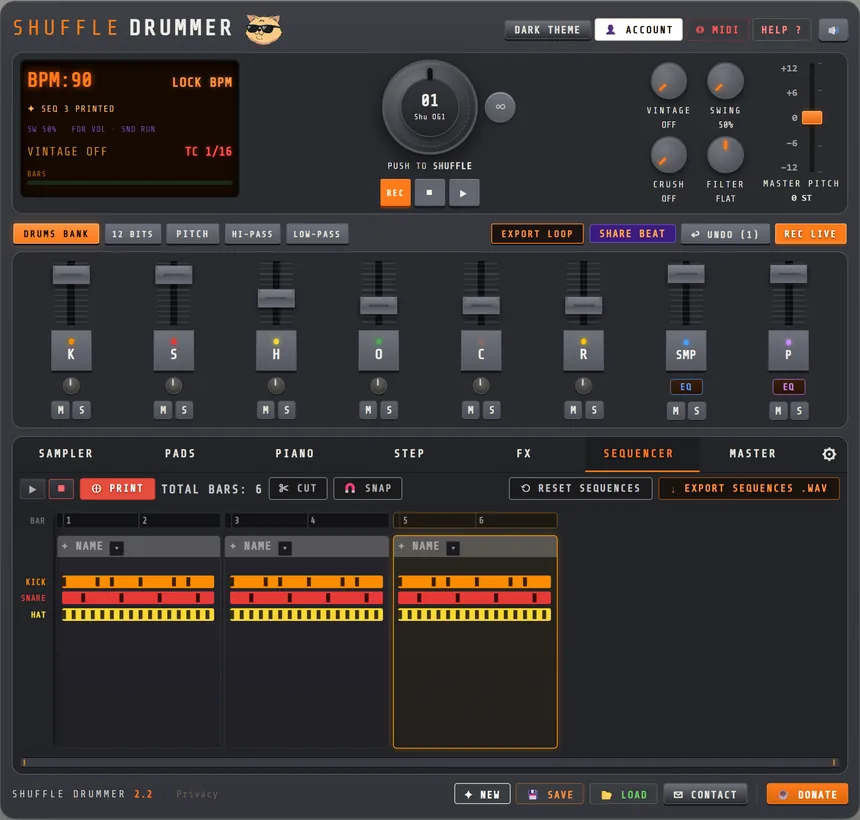
How a groovebox session goes
- Drums first. Turn the SHUFFLE wheel to a groove you like, edit the steps, set the swing. Pick a kit in the DRUMS BANK.
- Add a sample or a chord. Chop a loop in the SAMPLER tab and play the slices on pads, or play a bass line and a pad on the synth in the PIANO tab.
- PRINT the pattern. In the SEQUENCER tab, PRINT captures the current pattern as a part. Change the drums, mute the sample, switch the synth preset, PRINT again: that is your second part.
- Arrange. Name the parts (INTRO, VERSE, HOOK…), CUT and reorder them, set the total bars, and play the whole song from the top.
- Mix and export. Master EQ, bus compressor and tape on the MASTER tab, then export the sequence as WAV, share the full song as a beat card, or publish it to the TOP BEATS gallery.
Everything a groovebox should have, in the browser
Hardware grooveboxes put drums, sounds, sequencing and FX in one box so you can build a whole track without a computer. Shuffle Drummer brings that same all-in-one feel to the web, free:
- Drum engine — 6 drum tracks, synthesized drums plus sampled kits, a shuffle wheel of hand-made grooves, swing from 50% to 75%, per-step velocity, off-grid timing (online drum machine)
- Sampler — load and chop your own sounds into up to 64 slices, pitch them, remove the drums from a loop, play the slices on pads (online sampler)
- Synth and piano — a Minimoog-style synth with 96 presets and a sampled piano, on up to four piano-roll tracks
- Step sequencer — 16 steps per bar, 2 to 8 bars, grid from 1/8 to 1/32, 96 PPQ timing
- Song mode — PRINT patterns into named parts, cut, reorder, play the full track; each part keeps its own sounds, filters and synth preset
- Mixer and FX — 8 channels with EQ and filters, 5-band master EQ, SSL-style bus compressor, tape emulation, limiter, reverb, delay and 16 master FX pads
- Export and sharing — WAV stems and master, MIDI file, full-song MP3 share card, one-link sharing with remix, TOP BEATS community gallery
- MIDI in — pads, keys, pitch bend and mod wheel from any controller or an Akai MPC (Chrome and Edge)
Browser groovebox vs hardware groovebox
| Hardware groovebox | Shuffle Drummer | |
|---|---|---|
| Price | Several hundred euros | Free, no signup to play |
| Setup | Cables, power, SD cards, firmware | Open a URL, on desktop or phone |
| Your samples | Copy to the device | Drag a file into the sampler; nothing is uploaded |
| Song mode | Yes | Yes: PRINT parts in the SEQUENCER tab |
| Sharing | Record the output | One link, the other person can remix it; public TOP BEATS gallery |
| Knobs under your fingers | Yes | Plug in a MIDI controller |
You don't need an MPC, a Digitakt or an SP to get the groovebox workflow anymore. Open the page, make the track, export the stems. If you want the hardware feel on pads, see the MPC-style online page.
Made by a producer
Built by Mani Deïz, a French hip-hop producer since 1998, and three friends, it is 100% Web Audio API with zero dependencies, and it ships updates every week. Explore it as an online drum machine, an online sampler, a lo-fi beat maker or a full beat maker: it is all the same groovebox. To get started, read how to make a beat online.
Frequently asked questions
- What is a groovebox?
- An all-in-one instrument with drums, sounds, sequencing and FX in one box. Here, in your browser.
- Is it free?
- Yes. Playing is free and ad-free; a free account unlocks saving and export.
- Can I build a full song?
- Yes. PRINT patterns as parts in the SEQUENCER tab, name and reorder them, play and export the whole track.
- Do I need hardware or a download?
- No. Browser-based, on desktop and mobile, nothing to install. A MIDI controller is optional.