Free Online Synth — a Minimoog-Style Synthesizer in Your Browser
Shuffle Drummer has a synthesizer built in: an engine modelled on the Minimoog Model D architecture, with 96 presets, three oscillators, a filter, glide and modulation. Play it live, record it in the piano roll next to your drums and samples, and export the result — all in one browser tab, free, with nothing to install.
▶ OPEN THE SYNTH — FREE
PIANO tab → SYNTH · pick a preset · play · no install
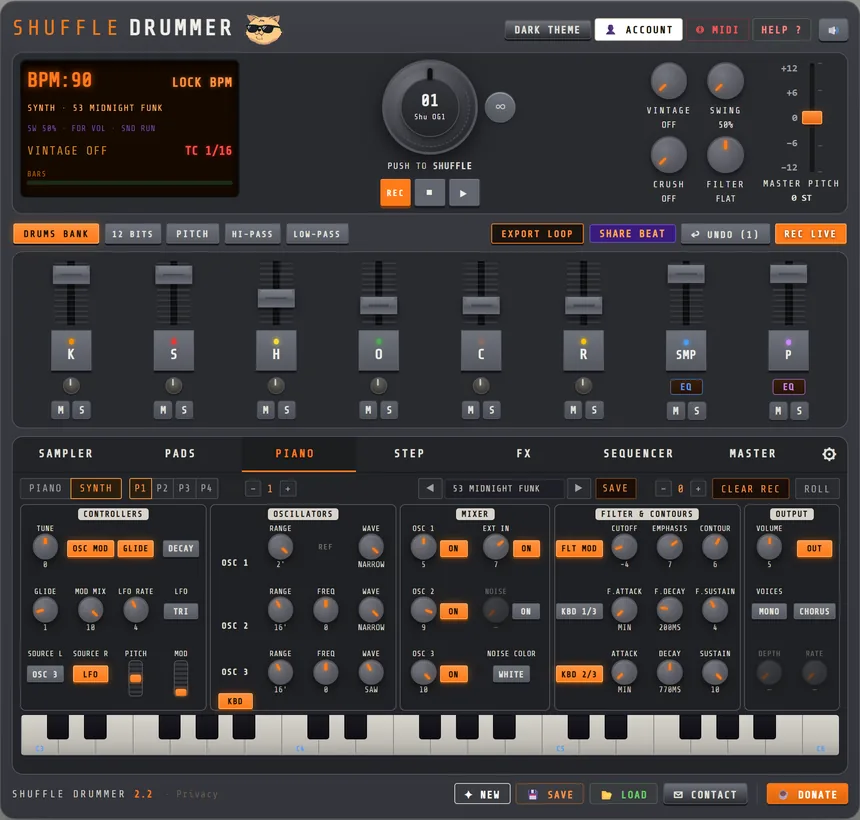
How to play the online synth, in 4 steps
- Open the PIANO pane and click SYNTH. The keyboard turns into a compact Model D-style panel with its five sections: controllers, oscillators, mixer, filter, output.
- Pick a preset with the ◀ ▶ arrows or the preset list: basses, leads, keys and brass, percussion, FX and atmospheres, plus the complete 1974 sound-chart collection.
- Play it on the on-screen keys, your computer keyboard, or a MIDI controller with pitch bend and mod wheel. Turn any knob: a lit knob means you have moved away from the preset.
- Record and sequence — hit REC, play your line, then open the piano roll to edit notes. The synth plays in sync with the drum machine and the sampler, through its own mixer channel.
A real Model D-style signal path
This is not a one-knob preset player. The engine follows the classic monosynth layout: three oscillators with their own range and waveform, a mixer to balance them, a filter with its own contour, a loudness contour, glide, and oscillator 3 usable as a modulation source for the filter and the pitch. It is monophonic by design, with last-note priority and legato retrigger, so fast ornaments and slides play the way you finger them. The DSP runs in an audio worklet for low latency, and the exact same code renders your WAV export offline, so what you hear is what you bounce.
96 presets, from 1974 to today
The preset bank is built from two historic sources: 52 patches that follow the 1974 sound charts (the famous synth, artist, keys, strings, woodwind, brass, percussion and FX sheets), and 44 patches that follow the official Model D manual. Every preset is editable, and the USER bank lets you save your own patches by name, right in your browser. The preset and its tweaks travel with your project and with your shared beats.
Not just a toy: a synth inside a beat workstation
- Up to 4 melodic tracks — P1 to P4, each set to SYNTH or to a sampled PIANO, so a Moog-style bass, a pad and a lead can play at once.
- Piano roll — record live, then edit your notes bar by bar, in sync with the step sequencer.
- Song mode — each part of your song in the SEQUENCER tab keeps its own synth preset and settings, so the patch can change from intro to hook.
- Mixer channel — the synth has its own fader, mute, filter and EQ next to the drums and the sampler.
- MIDI in, MIDI out — play from any controller, and export your pattern as a MIDI file for your DAW.
- WAV export — stems or a full master, with the synth rendered sample-accurately.
- Works on phone — the panel folds into section tabs (CTRL · OSC · MIX · FILTER · OUT) with a two-octave keyboard.
Made by a beatmaker, for beats
The synth was added by Mani Deïz, a French hip-hop producer making beats since 1998, who wanted a proper bass and lead instrument next to the online drum machine and the online sampler. Pair it with chopped samples and the shuffle engine and you have a complete online groovebox in one tab — without leaving the browser.
Frequently asked questions
- Is there a free Minimoog-style synth I can play online?
- Yes — a Model D-style engine with three oscillators, filter, contours, glide and modulation, running in your browser with no download.
- How many presets does the online synth have?
- 96: 52 from the 1974 sound charts and 44 from the official manual, grouped by bass, lead, keys and brass, percussion, FX. Plus your own USER bank.
- Can I play the synth with a MIDI keyboard?
- Yes. Notes, pitch bend and mod wheel are supported, and you can also play from your computer keyboard or the on-screen keys.
- Can I record the synth and sequence it with drums?
- Yes. Record, edit in the piano roll, and run up to four melodic tracks in sync with the drum machine and sampler.
- Is the online synth free?
- Yes. Playing and tweaking is free with no signup; a free account unlocks saving and WAV export.
Minimoog, Model D and Moog are trademarks of Moog Music Inc. Shuffle Drummer is an independent project and is not affiliated with or endorsed by Moog Music. The synth is an original engine inspired by the Model D architecture, not an official emulation.